An online store was taking phone calls every day from people already on its website: is it in stock, can you send it to my shop, is it compatible. We built it an agent on a model of its business, and those calls have dropped a lot. Here is the case with one month of its figures, and the cheapest version of the same method timed against our own site.
A magazine that fits one replica and not another
An airsoft store sells replicas and it sells what goes on them: magazines, batteries, sights, spare parts. Most of the parts look alike, and almost none of them fit every model.
A search box cannot solve that. It matches words: ask it for a magazine and it returns everything with the word magazine in it, including what does not fit your replica.
Compatibility is not a word that appears in a description. It is a relation between two products, and a relation is something a model holds and a keyword index does not.
In a catalog where near-identical parts fit different models, that is the difference between a sale and a return.
What we built for that store is an AI shopping assistant that also does the support, on a single model.
We modeled the entire ecommerce catalog, with its spec sheets and its compatibilities, plus the returns policy and the orders. All of it as one structure, before any conversation existed. That did not come from pasting an address: their systems had to be connected and what was inside them modeled.
What comes out of that is not a chat that answers. Because the returns and the orders went into the same model, the agent that recommends the compatible part is the same one that processes the return and the same one that says where an order is.
Selling and support stop being two separate tools: recommending is the sale, and processing a return or saying where an order is is the support.
What was there before shows it better. The store took phone calls every day from people who were already on the website, and they called about three things: whether the product was in stock, whether it could be sent to their shop, and whether it was compatible with what they already had.
All three answers were already in the model, because all three are questions about the catalog and about the orders. Since the agent went in, those calls have come down sharply: the answer now sits where the doubt was. Not three agents, and not three integrations.
In one month that agent held 4,153 conversations, and 386 ended with the visitor leaving their contact details: 9.3%. We have no before figure, so we are not claiming it went up, or by how much.
The six layers under every agent we build
The expensive part is never the chat. It is writing down how the business works underneath: what entities it handles, what operations it runs, what rules it obeys. That model is what we call the ontology.
It has six layers, read from the bottom up. Connect is where the data comes from. Model, the entities and the rules. Replicate, the twin: that data loaded so the agent can ask it questions. Execute, the agents working on top. Govern, where they stop to ask permission. Converse, which channel the customer is spoken to on.
Of the six, the one that decides everything else is the second, modeling. A chat installed by pasting a snippet begins and ends at layer 6: it answers with the words it can find. Here the conversation is the last thing built, which is why the agent knows what fits what.
Governing is the layer buyers ask about next. An agent that recommends a part is reading; one that issues a credit note is acting, and acting is where it stops and asks.
Modeling does not depend on which door the data came through.
A public website yields the outward-facing part; an ERP yields what only lives inside it: the chart of accounts, how stock actually moves, the pricing exceptions each customer has accumulated. That layer serves both.
Modeling an ERP is not something you paste an address for: it is a separate job that starts with an audit. What nobody has to rebuild from scratch is the model: on top of it comes the agent that watches a warehouse or the one that prepares a credit note.
Two minutes, seven fields and three stops
The cheapest version of that method starts from a public website, which is why it can be timed end to end. We ran it against ours, forty addresses in the sitemap, and from pasting the address to having the agent published took 127 seconds.
What gets asked of the company fits on one line. The brief screen offers seven fields and only one of them blocks the flow, and it is not even a specific field: a URL or a description will do. The rest it fills in itself, down to taking the brand color off the site.
Who does what
The person
- Pastes one URL
- Approves three screens
- Edits any of the seven fields
The system
- Writes the brief on what the business does
- Reads the sitemap
- Writes the exclusion filter and picks the useful pages
- Lists the available integrations
- Imports and indexes the pages
- Designs the conversation tree
- Publishes and installs the widget
What the model proposes does not reach the screen raw: automatic checks go over it afterward and prune the paths that lead nowhere.
Three of the seven phases are stopping points: the build halts and waits for somebody to confirm the summary of the business, the menu languages and the page filter. The two long phases are the ones that read the site and draw the conversation, and between them they hold almost the whole clock: the other five together take under five seconds.
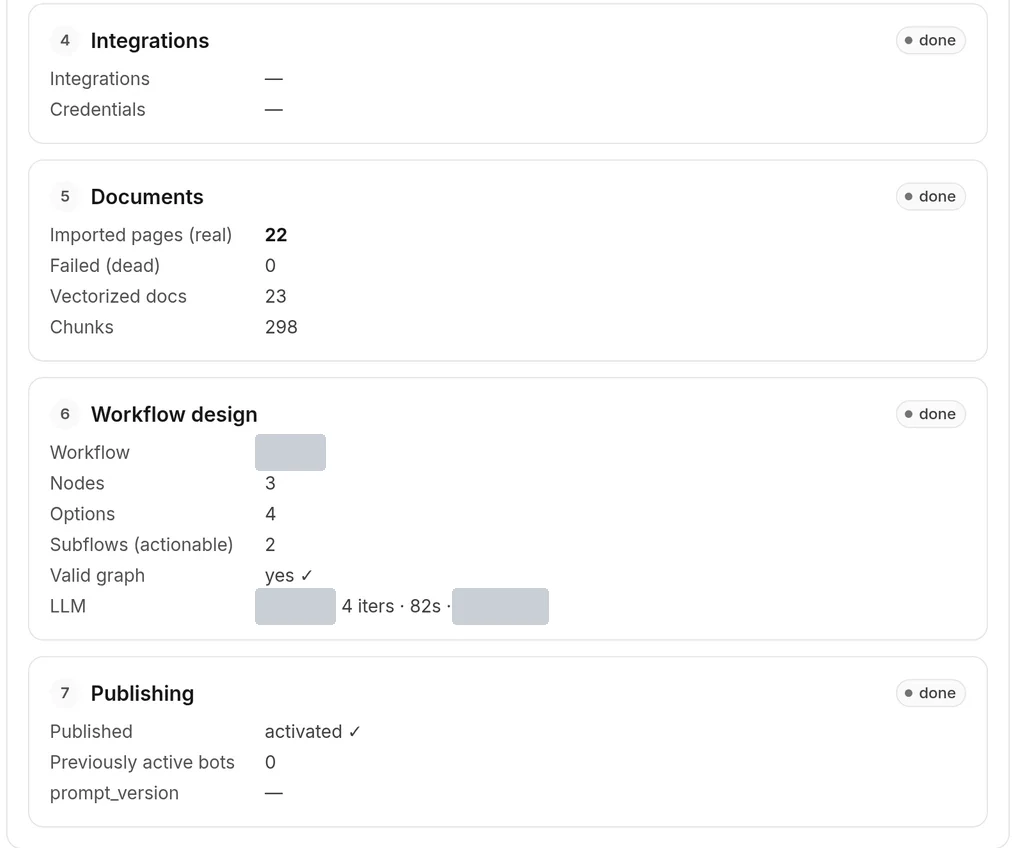
The last four phases, as the panel reports them. Reading the site gives the same on both runs: 22 pages and 298 fragments. Designing the conversation does not repeat: 82 s on this run versus 68.7 s on the first.
What the review finds before anyone sees it
We review that draft ourselves, before the customer sees anything. On this run it found this.
Of the 40 URLs on our own site, 18 were the Spanish pages and all of them were dropped. No warning was raised anywhere. Tracing it back turned up three faults that line up: the Spanish pages had no way to declare what they were, a threshold that never fired, and the main language taken from the brief instead of from the site.
What that taught us is worth more than the fault. The phase that discards pages is one of the three stopping points: the screen showed "22 useful, 18 discarded" and somebody pressed continue.
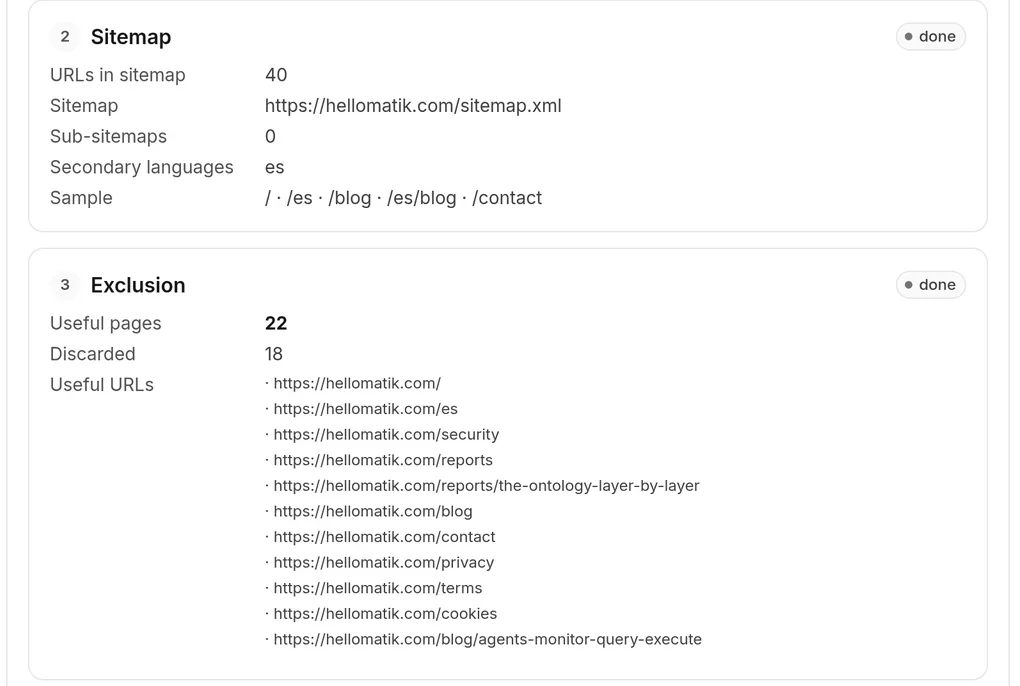
The silence, on screen. Phase 2 does see es as a secondary language; phase 3 keeps 22 pages and discards 18, and every kept URL is an English path. No warning anywhere.
A stop is worth nothing if it shows a count instead of what the count means. That is the difference between seeing "18 discarded" and seeing "the whole Spanish side is gone".
That is why we do not leave the review to the customer: we know where a count lies and where you have to go and look at the site.
What the company gets is an agent already reviewed, with the pages chosen and the tree drawn, and the only thing left for it to decide is whether that tree is the one it wants for selling.
Where this text stops
The store's figures are one month. The drop in phone calls is what the store tells us and we did not measure it ourselves, so it goes without a number: we say it dropped a lot because that is what we know, and we are not putting a percentage on it that we do not have. How much it sold and how many returns it avoided are their numbers.
There are sites it cannot build itself on. With no sitemap the run fails, and if the site is drawn entirely by JavaScript the read comes back with zero documents.
The two-minute build lists integrations, it does not connect them. Connecting them is a person's job and is not counted in the 127 seconds. The store in this post had its systems connected first, which is the long version of the work.
The 127 seconds are for our own site, forty addresses, measured in development. A site of 4,000 does not take two minutes, and how long it does take we do not know. The screenshots are from a second run the same day: they show what the screens say, they do not confirm the timings.
None of that touches the sentence the post rests on. Compatibility is a relation, and a relation has to be written down somewhere before an agent can use it. Written down once, the same model answers what fits, where the order is and how a return is handled, which is why a store that was taking those three questions by phone now takes them on its own website.
FAQ
- How does the agent know what fits what?
- Because compatibility is modeled as a relation between products, not as words in a description. That is why it can say an accessory fits one model and not another.
- Will it cut the phone calls my store gets?
- That is what happened in the store in this post: people were calling to ask about stock, shipping and compatibility, and those three answers now live in the agent. The drop is what the store tells us; we did not measure it ourselves.
- Does it work on any website?
- It needs a sitemap. Without one the run ends in failure, and there is no fallback crawler today.
- My site is in two languages. What happens?
- The menu languages are not guessed: they are chosen by hand at one of the three stops, and which pages come in is reviewed at another. That review is ours, and this post is exactly why we do not skip it.
- What does my company have to do?
- Supply the website address. We run the build and sit through the three stops ourselves, so what reaches you is an agent already reviewed. The one thing left for you to decide is whether the conversation tree is the one you want for selling.
- What does it cost to have built?
- It depends on the source, not the method. On a public website the work is the work in this post. On a product catalog with its returns and orders there is modeling to do first. On an ERP there is an audit on top of that. It is quoted case by case.
- Does it connect my tools?
- The two-minute build does not: it lists the available integrations and creates none. Connecting systems is work we do, and it is what the store in this post needed before anything else.
- What happens if a phase fails?
- The session stops and keeps the partial work. Retrying resumes from the phase that failed, not from the start.
Sources
- 1.The store's panel, one month of activity: 4,153 conversations, 386 contacts, a 9.3% rate. The customer's data, published with permission and without identifying them. ↩
- 2.Our own build run against hellomatik.com, 31 August 2026, in the development environment: the per-phase timings, the 40 URLs and the 22 pages kept. Internal data. The screenshots in this post are from a second run the same day. ↩
- 3.Sitemaps XML format and protocol, sitemaps.org ↩